
Vinci Code CLI
Your terminal. Your choices.
A coding agent for useful work in your own terminal. Make changes, inspect what happened, and decide what happens next—with your own provider key.
Bring your own key (BYOK). No Vinci account required for this path.
Delegate the work. Inspect the outcome. Keep the decision.
A familiar command-line workspace, with explicit outcomes, review points and evidence from the checks you run.
Public release 0.0.54Watch the work, then read the outcome.
The agent changes a Python script and runs it. Its final receipt still marks the change unverified because the project has no automated test suite.
These are public product captures in English. They demonstrate the recorded sessions, rather than guaranteeing every outcome or the latest interface.

The details that help you stay in control.
Actual terminal captures show how a session presents a consequential action, an unchecked result and a review request.
See the action before it runs.
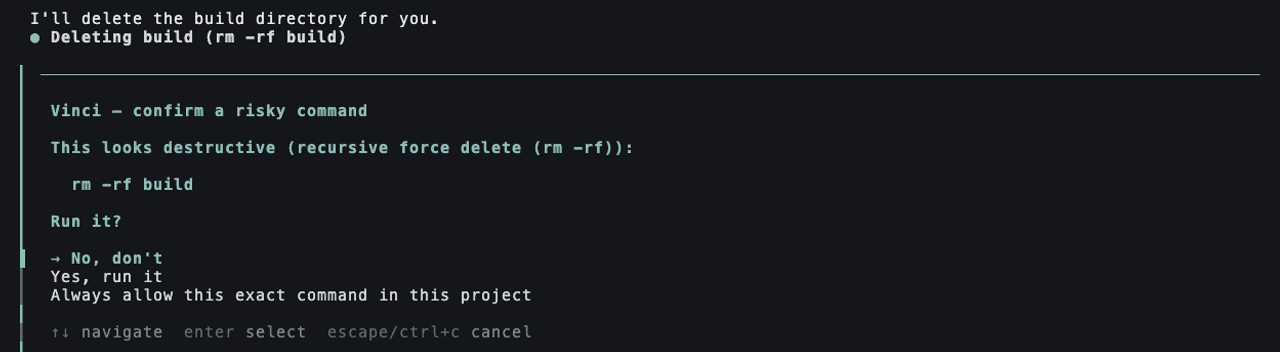
In this capture, a destructive command is shown before execution. The prompt waits for a decision, with “No, don’t” selected.
Separate finished from verified.
The receipt states what changed, which checks ran, what remains unverified and the recorded cost of the turn.

Review before using the changes.
In this session, background agents work in separate project copies. A finished agent’s changes wait for approval before they are used.

A receipt records the checks that ran; it does not prove the result is correct. Command guards have limits and do not establish universal safety. Review consequential work and supply checks appropriate to the task.
Start with your own provider.
Install the CLI, connect a supported provider and try a bounded task in a project you can review.
curl -fsSL https://vinci.getsimpledirect.com/install | shThe installer follows its selected distribution channel. The manifest identifies the version it currently serves; the public release link identifies a published GitHub artifact.
Install the CLI.
Use the command shown here or follow the installation guide for your platform.
Connect your API key.
Start vinci, choose the API-key path in /login, and follow the documentation for your supported provider.
Give it one useful task.
Choose a small coding change. Review the proposed actions, run your project’s checks and inspect the final receipt.
Platforms and requirements
Node.js 22.19 or newer, curl and tar. macOS and Linux are supported; Windows uses WSL2 rather than a native Windows installer. Linux shell execution also requires bubblewrap at a supported path.
Vinci Managed
Managed authentication and inference are under maintenance, with no announced return date. Use the documented BYOK path with your own provider credentials.
See the authentication prompt and provider catalogue

Open source, with its origins visible.
Read the code, examine how it works and follow development in the public repository. Source availability is separate from production qualification.
Built on Pi, by Mario Zechner.
Upstream baseline: 244f1deaf1ae0fc1a242d9df5cddf457cf3d36a7
Know the boundaries.
This command-line tool is still evolving. Settings and extension interfaces can change, and outcomes depend on the task, model and checks you provide. It is not a qualified cross-device autonomous product.
Read the current implementation limitations
- The published repository is a squashed export: upstream Pi's history is intact, but the Vinci layer arrives as a single commit per release rather than as its development history.
- Builds are signed in a private repository, because the release role is deliberately not reachable from a public one. Releases are cut there and mirrored to the public repository, with the artifact's checksum compared against the signed manifest before it is attached.
- No native Windows build: the installer is a POSIX shell script. Windows users run it inside WSL2, which works today and is documented.
- On Linux, running shell commands needs bubblewrap at /usr/bin/bwrap, /bin/bwrap or /usr/local/bin/bwrap. Installed anywhere else — through snap, nix or linuxbrew — and Vinci disables bash rather than run unconfined.
- It is a command-line tool. There is no graphical interface, and none is planned for the first release.
- Secrets are masked before the transcript is written — typed text and tool output alike. The limit is pattern coverage, not timing: a credential whose format the patterns do not recognise is stored verbatim, and sessions recorded before those hooks existed were never masked. Treat ~/.pi/agent/sessions as sensitive for that reason.
- Settings and extension interfaces can still change before 1.0.
- Evidence of what a run did is only as good as the checks you give it: it reports what was run, not that the result is right.
Useful work starts with a clear next step.
Try one bounded task, review the evidence and help shape what Vinci builds next.